


Every college, university, and library system has one: the archive. Decades of course catalogs, committee minutes, finding aids, research reports, and grant documents most of them stored as PDFs, and most of them inaccessible to people who use screen readers. With the DOJ’s ADA Title II rule requiring WCAG 2.1 AA compliance for web content, including PDFs, starting April 26, 2027 for public entities serving 50,000 or more people (and April 26, 2028 for smaller entities), archival PDF remediation has suddenly become a major budget line item.
The obvious plan is to remediate everything up front. For most academic archives, it is also the most expensive plan. This guide walks through where your PDF accessibility budget actually goes, why the “process everything on upload” model wastes most of it, and how PureData Cloud’s Point-in-Time archival PDF remediation changes the math.
Where the PDF Accessibility Remediation Budget Actually Goes
When PureData Cloud runs in your AWS account, your costs come from three places:
-
AWS infrastructure: S3 storage, Lambda compute, and Textract, billed pay-as-you-go to your own account with no markup.
-
Adobe Acrobat Services API: Billed per document transaction under your own Adobe agreement. Auto-Tag, which applies the WCAG structural tags, uses 10 transactions per page (with 500 free transactions included per month).
-
PureData deployment and support: Quoted to your document volume, with no per-user licensing fees.
Cloud storage is cheap. A PDF sitting in S3 costs a fraction of a cent per month. The Adobe API is different: because it is metered per page, it scales with the size of your archive, not the size of your audience. For large university collections, Adobe API fees are usually the biggest variable cost in the entire PDF accessibility pipeline.
The Hidden Assumption: Processing Every Archival PDF on Upload
Most remediation tools, and most manual remediation vendors, share one costly assumption: every document gets processed the moment it enters the system. Upload 100,000 files, and you pay to remediate 100,000 files.
That assumption made sense when PDF accessibility focused mostly on newly published content. It makes much less sense for historical archives, where usage follows a steep long tail. A few hundred documents the current course catalog, admissions forms, popular finding aids get heavy traffic. Tens of thousands of older files may never be opened again. Paying per-page API fees on that unused long tail means paying for inventory, not real demand.
How Point-in-Time Archival PDF Remediation Works
Point-in-Time archival PDF remediation separates publishing a document from processing it. The automated pipeline runs in four stages:
1. Upload: Zero Processing, Zero API Calls
Your entire collection goes into an S3 bucket you own in one batch. No Lambda function runs, and no Adobe API call is triggered. Your only upfront cost is pennies for S3 storage.
2. Permanent Link: Ready Before Processing
Every file immediately receives a shareable, permanent URL. Your web team can publish those links to the university website, library catalog, LMS, or student portal right away instead of waiting months for a bulk remediation queue to clear.
3. First Click Triggers the Full Accessibility Pipeline
When a visitor genuinely opens a document for the first time, the full pipeline fires automatically: AWS Textract extracts document structure (with OCR for scanned files), the Adobe Acrobat Services API applies WCAG tags, AI generates context-aware alt text, and an automated compliance check runs. While that happens, the visitor sees the original file with a clear notice that an accessible version is being prepared. This is the exact moment the Adobe API is charged never at upload.
4. WCAG 2.1 AA Compliant PDF Live in 5–15 Minutes
Once processing finishes, the exact same permanent URL serves the compliant PDF to every future visitor. There is no CMS update, no redirect, no re-upload, and no manual staff intervention. Output quality is identical to bulk processing—running the exact same pipeline and generating the same compliance report.
The Math on a 100,000-Document Archive
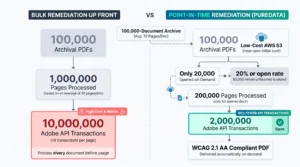
Take a typical university archive of 100,000 PDFs where 20% of files are ever opened. Remediating everything up front sends all 100,000 documents through the Adobe API. With Point-in-Time archival PDF remediation, only the 20,000 opened documents are processed: 80% fewer Adobe API transactions and an 80% reduction in API fees.
To see what that looks like in real numbers, assume an average of 10 pages per document:
| Comparison Metric | Remediate Up Front | Point-in-Time Remediation |
|---|---|---|
| Documents processed | 100,000 | 20,000 |
| Pages through Auto-Tag (avg. 10 pages/doc) | 1,000,000 | 200,000 |
| Adobe transactions (10 transactions per page) | 10,000,000 | 2,000,000 |
| Transactions avoided | — | 8,000,000 (80%) |
| Every file published with a live link | After processing | ✓ Immediately |
i
Figures above are illustrative. The 10-page average and 20% open rate are baseline assumptions; your institution’s page counts, open rate, and Adobe rates will vary. Auto-Tag metering of 10 transactions per page and the 500 free monthly transactions follow Adobe’s published transaction metering. For an external benchmark,
ITHAKA (JSTOR)
has reported roughly $0.026 per page for its own on-demand remediation pipeline on AWS.
But does deferring remediation put compliance at risk?
It’s the right question to ask. The Title II rule includes narrow exceptions for archived content kept only for reference, and for documents posted before the compliance date, unless people use
them to apply for or access your services. The intent is clear: content people actually use must be accessible.
Point-in-Time Remediation lines up with that intent. The moment a document is used, it is remediated automatically, without anyone having to notice, file a ticket, or re-upload it. For the
small set of documents you know will be used — current catalogs, syllabi, applications, forms, policies — we recommend a hybrid approach: bulk-remediate them up front so even the first
visitor gets the accessible version, and let Point-in-Time handle the long tail.
Every processed document gets the same compliance report and is logged in a timestamped audit trail, which supports a defensible, good-faith accessibility program. (This is planning
guidance, not legal advice; pair automated remediation with periodic human audits and legal review.)
Why Running in Your Own AWS Account Matters for Cost
-
No infrastructure markup: AWS usage is billed directly to your institution’s account at your exact rates, including any committed-spend or higher-ed discounts you already have.
-
Your own Adobe agreement: API transactions run under your existing Adobe contract, giving you full visibility and control over your per-transaction rate.
-
Cost visibility for finance: The PureData admin dashboard tracks per-document AWS costs and real-time Adobe API consumption, so IT and finance teams can forecast PDF accessibility budgets accurately instead of guessing.
-
No per-user licenses: Add as many library staff, web editors, and accessibility reviewers as you need without increasing your bill.
Five Questions to Ask Any PDF Remediation Vendor
Before signing a multi-year contract to remediate your institution’s archive, ask every vendor these five questions:
1. Do you charge to process files that nobody ever opens?
Traditional bulk vendors charge per page upfront regardless of traffic. A demand-driven model ensures you only pay API fees on documents visitors actually access.
2. Whose Adobe agreement are API calls billed under, and can I see per-document usage?
Running API calls under your own Adobe contract prevents vendor markups and gives your finance team granular, per-document cost tracking.
3. Do remediated files keep the same URL, or do we have to re-upload and re-link?
Changing URLs breaks bookmarks, LMS links, and search rankings. Your remediation pipeline should replace the file seamlessly at its original permanent link.
4. Where are our documents processed, and does sensitive data leave our environment?
When the pipeline deploys inside your own AWS account, institutional records, research papers, and student data never leave your cloud perimeter.
5. What audit trail do we get for each remediated document?
To demonstrate ADA Title II due diligence, ensure every processed file generates a timestamped compliance log and accessibility report.
Start With Your Archive
If your college, university, or library system is sitting on tens of thousands of legacy PDFs ahead of the April 2027 ADA Title II deadline, the most cost-effective compliant document is the one you only pay to fix when someone actually needs it. PureData Cloud deploys into your AWS account in one click via CloudFormation, and running an archive pilot is the fastest way to measure your real open rate and projected savings.